Not sure what's outdated? Modal editing isn't outdated. The position of hjkl hasn't changed, so it isn't as problematic as Emacs keys or the vim escape keys. HJKL being on the home row has the same benefits as, say, WASD for movement in games, where using the arrow keys is objectively worse due to placement and the lack of keys around it.
Read the link. Modal editing dates from the editor era in which time it generally was infeasible, impractical, or very technically challenging to update the screen and accept commands in a unified mode.
The cursor keys being on the home row is just because it happened to be that way on the terminal where vi was invented. We have long since standardized on separate cursor keys, which are more intuitive.
Separate cursor keys are much more intuitive indeed!
But people who like Vim don't like it for its intuitiveness. Cursor keys aren't ergonomically located, switching from touch typing to moving the cursor with cursor keys involves a massive hand movement compared to how frequently it's necessary. Using HJKL for movement fits extremely well together with touch typing, and the vim mode switching is more comfortable than moving the hand to the cursor keys.
Don't confuse "intuitive" with "ergonomic" or "efficient" or good". They're very often not the same thing.
The problem with hjkl as cursor movement in vi is that it cannot be used in all modes so you still have to have and use actual cursor keys.
Switching modes just to add a single character before last is annoying.
Fixing a typo in filename when saving is impossible without cursor keys.
If you have and use real cursor keys then having to remember and use hjkl is just not practical.
Meh I find hitting esc or ^c much easier than moving my hand to the arrow keys and back.
Also, many kind of typos can be fixed without entering insert mode! If there's an extra character, I delete it with dl. If a character should've been something else, I use 'r' followed by the letter it should have been.
I agree that command mode is more annoying than necessary since it relies on cursor keys to move the cursor.
That doesn't make it outdated though. It's a happy accident that something developed for a certain set of limitations still has a lot of benefits today without those specific limitations.
Who standardized on separate cursor keys? Yes, we have arrow keys, but they're ergonomically worse than anything that lets you stay on the home row. I'll even take the Emacs keys over arrow keys.
>The cursor keys being on the home row is just because it happened to be that way on the terminal where vi was invented. We have long since standardized on separate cursor keys, which are more intuitive.
Intuitive and convenient are two orthogonal things, I bet that the creators of that terminal put the cursor keys simply because it's convenient to have them on a home row, unlike the creators of the IBM PC keyboard who valued intuitiveness more. I don't see how the ergonomics of typing is outdated.
Besides, after all these years HJKL is a common convention already, and can be even more intuitive for many people (not just programmers, but also e.g. roguelike players who usually have the diagonal movement keys around HJKL as well).
But that's a bit of a red herring since vi's command language makes the entire single-character cursor movement "outdated" in a sense. The abbreviated commands are highly composable and let you navigate and edit any structured text with the speed of thought. That is the actual value of vi.
It's funny to me that you use the word 'standardized', since one of my biggest gripes with cursor keys is that they're different on every single keyboard layout I use. I'm an emacs user, but I love using letter keys for cursor movement because they're consistent across all keyboards, which helps a lot with my muscle memory.
Like orbital-decay says: intuitive matters not at all. Convenience is what matters. I don't use a modal editor, but I do have the control keys on my Windows keyboard mapped to cursor control keys: the control-H, -J, -K, -L keys all correspond to the H, J, K and L keys when vi(m) is in the cursor control mode, leaving them for ordinary alphabetic use when I am not pressing the control key. Similarly for a bunch of other cursor control keys. And control-Q toggles between selecting and not selecting. I've been using this since around Windows 3.11. It is very convenient, and my fingers learned what to do decades ago--they now operate without any intuition whatsoever.
That Symbolics keyboard looks like a minor variation on the PC keyboard in some regards.
The Control key is in the same wrong general location; it wants to be where Symbolics has Rubout, and where PC keyboards have Caps Lock.
Another bad design was the DEC VT100 terminal keyboard. It put Ctrl to the left of a Caps Lock key: [Ctrl][Caps Lock][A][S][D][F]. Yikes!
Apple II had this right:
[Ctrl][A][S][D][F]
Commodore 64: Ctrl weirdly high:
   [Ctrl][Q][W][E]
  [Rs][Sl][A][S][D]
Ctrl next to Q. Rs = "RunStop", Sl = "Shift Lock".
In any case, I need the LeftControl to be somewhere far to the left, just like LeftShift.
Here is why: I only use those! I never use RightShift or RightCtrl.
When I type Ctrl-Q, Ctrl-W, ... Ctrl-Y, Ctrl-A ... Ctrl-G, Ctrl-Z ... Ctrl-B, I'm always using the left pinky, plus another finger of the same hand.
Same with the capitals of those letters: LeftShift with left pinky, plus left hand finger.
Whenever I have to use Alt, which is rare, I use LeftAlt, and it's quite awkward with the left side keys due to its position.
Here is why I use only LeftShift: from time to time ALL CAPS material occurs, like when typing identifiers such as PTHREAD_MUTEX_INITIALIZER. The only way to type these fast without using the Caps Lock key is to hold down shift with one finger and just type with the remaining nine fingers. Changing between left and right Shift in order to always use the opposite Shift key would be slow and prone to typing mistakes. Once you can type arbitrary material blindingly fast with your pinky holding down the LeftShift key, it makes no sense to think about the existence of RightShift.
I used to do exactly the same. But then I developed RSI in my left forearm, which I blame on overusing it for all modifier keys (including CapsLock as my only Ctrl and only using left shift).
Afterwards, I used a Karabiner Elements script to completely block myself from pressing a left-hand modifier and left-hand letter key simultaneously, forcing myself to learn proper two-hand typing of modifiers. My arm feels better now, and I’ve actually finally appreciating having a Caps Lock key precisely due to the struggle you describe - I’m convinced that two-hand chording is healthier than pressing multiple keys simultaneously with one hand, but at the same time typing e.g. TODO out is then unbearable without a real caps lock key.
I actually like the concept of foot pedals or thumb cluster keyboards, which sound like two of the most ergonomic ways to use modifier keys.
The main issue is that due to my work I have to regularly work on a laptop, and anything that deviates too much from a standard keyboard will cause too much friction as I switch back and forth. It would have been easier to go all in on custom hardware if I worked at one desk all day.
The Symbolics keyboard, and before it space cadet and knight keyboards, take the idea that you're hitting modifier with the opposite hand - no pinky involved.
This is something so obvious that I don’t understand how I’m the first person I know of to say it: The hand is designed to work with the thumb and fingers in opposition. Therefore, modifier keys should go under the thumbs and the other keys under the fingers. Because the thumb can comfortably and easily oppose each of the four fingers it follows that each thumb should have four available modifier keys spaced to match that natural ergonomic.
The keyboards with a thumb cluster are a step in the right direction. Sadly, the positioning is suboptimal at best, because the design philosophy treats the thumb as just another stronger finger.
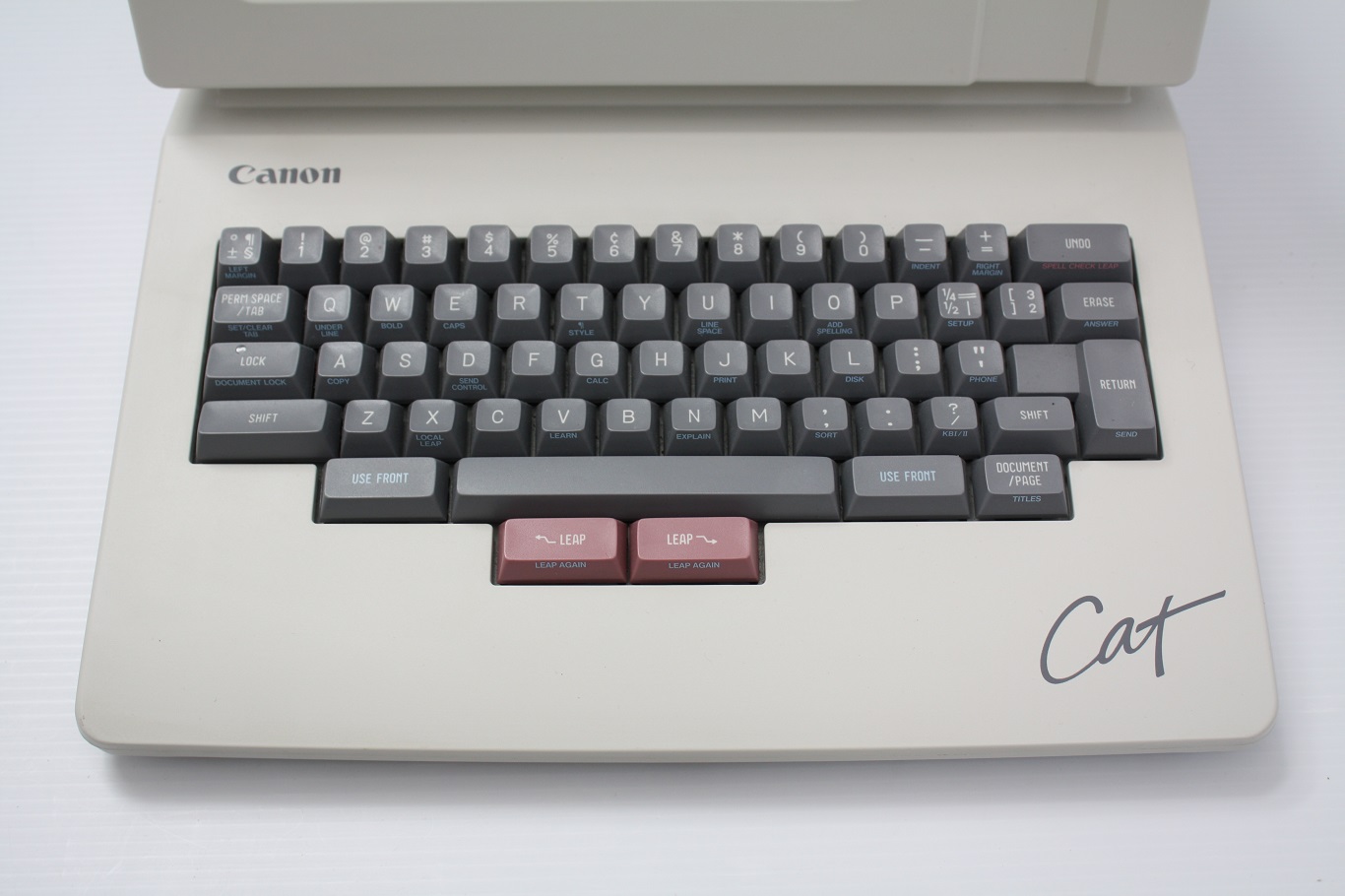
In my opinion, a keyboard like the Canon Cat, with modifiers centered under the spacebar [1], would be a joy to use: familiar yet more ergonomic. Sadly, very few keyboards use this layout.
There is a very simple solution to emacs pinky, although it doesn't work on laptop keyboards: pressing the ctrl key with your palm. Whenever I see someone contort their pinky I am shocked that this convenient (and obvious in retrospect) alternative hasn't caught on.
One of the first things most people configure with Vim is a more convenient way to escape (ctrl+[ not withstanding) into normal mode. I don't know enough about Emacs culture, but given how prevalent Ctrl/Meta are I would expect something similar to the point that those not doing it are the exception.
Vim has several nice escape keys, including the ability to customize your own. Some of the ones I've seen people use are:
Ctrl + ]/[ (I forget which...I've never used this one)
jj
Caps Lock.
My preference is to globally configure my Caps Lock key in whatever OS I am to "ESC on tap; Ctrl on Hold". This works amazing for VIM and is fantastic for non VIM usage as well.
Note: I don't use the mac regularly enough since I discovered this so I'm not sure if it's possible on the Mac (historically Karabiner has achieved whatever I've needed, so I suspect it would be able to do this as well) or if I should set it to CMD instead of Ctrl (On Mac, CMD, or the Apple Key, or whatever Apple is calling it these days, is far more analogous to Ctrl on other platforms).
How is it fantastic to use a combo of the worst finger with the second worst motion (sideways pinky for caps) for such a frequent action add mode switching?
Ctrl+] is similarly bad
jj doesn't work for multilingual layouts (chance that this sequence is used in typing in that language)
(yes, Karabiner can achieve what you've described)
I guess it depends on your dexterity, hand placement on the home row and the keyboard you’re using, but my left pinky falls onto caps naturally and I pull it in towards my other fingers for typing letters.
All of those are options. You don’t need to use all of them. Ctrl+] may be bad but people use it (I don’t like it which is why I’ve never used it, but there may be layouts in which it works well).
But im honestly struggling to see how pinky on the left cap is a bad option. And even if its a bad option, its a lot better than either CTRL keys, rhe ESC key, or the cursor keys which would be necessary to use without modal editing.
Yeah I'm a little surprised not to see the article touch on keyboard layouts (e.g. DEC, Sun) that had Ctrl in the home row where Caps Lock is on a PC keyboard. While Emacs may have been initially developed on the "space cadet" keyboard, it really became popular on Unix systems that often had an even-easier-to-reach Ctrl key. And to this day swapping caps lock with a modifier remains fairly common.
Switching Esc and Caps lock is one of the first things I do on a new machine. Without it Vim and every place I have vim bindings (evil emacs) would be way too painful to use.
I've started swapping ESC and caps-lock first using emacs. However, I feel, if you have a good MX keyboard and press Ctrl with your palm. It is actually really nice
The mod swap tragedy is a subtle variation of a very common bug in keymap design: investing in superficial labels instead of real muscles
Like if the keymap were designed: "first key left of space" is our primary prefix since it's the most convenient (thumb) modifier, then the physical mod swap would've had no effect, and given the dynamic nature of the underlying language you could even have it be changed in a single variable to have an effect on all the keybinds and all the docs
(also yet another illustration how arbitrary bad defaults can stick forever, like vim using HJKL instead of fully going home keys JKL; just because some ancient keyboard had left arrow on H)
I think HJKL is fine because I primarily move my cursor down and I primarily use my index finger for things as opposed to the other three (non-thumbs).
On the other hand (no pun intended), I have countless hours invested into WASD since the Quake days[1] in the 90s. There I press W most often and most definitely with my middle finger. So the middle finger can definitely be trained to a very high level!
[1]: I started my shooter "career" with Wolfenstein 3D but since there was no mouse involved, I was using the arrow keys. On the IBM layout one would press up and down with the middle finger (which I suppose is sort of your point).
The first thing I do with a WASD keybinding is changing it to ESDF, so that I have a tactile feedback for my index, to make sure I'm on the right keys. That, of course, tends to mess up other predefined keybindings, but that's a sacrifice I'm willing to make.
With home key cursor you can still have JK as down/up keys.
Inverted T for arrow keys could also be used as an alternative by the "very strong muscle memory from games" crowd, that's a valid argument, but it's not some arbitrary arrows painted somewhere decades ago (the OP's keymap also uses inverted T in IJKL)


The author of this article also has information on how early keyboards and circumstances influenced the (now outdated) design of vim. http://xahlee.info/kbd/history_of_vi_keys.html